Showing posts with label Visual Studio. Show all posts

Friday, January 22, 2016

Dependency Injection - Intro

This gonna be post series which I gonna continue .. Because this is bit complex and without theoretical part hard to understand.

Fist thing first.. Lets move with theoretical background of it with this post

 Assume this scenario.. - Entire Post sequence will use  this as example
There is student registration system we need to develop solution for student registration  

Here is our usual MVC code.


public class Student
   {
       public int StudentId { get; set; }
       public string StudentName { get; set; }
       public string RegId { get; set; }
       public int Age { get; set; }
 
 
       public IEnumerable<Student> GetStudents()
       {
           return new List<Student>();
       }
   }
 
Model Class 
 
public class StudentController : Controller
    {
        private readonly Student _student;
        public StudentController()
        {
            _student = new Student();
        }
        // GET: /<controller>/
 
        public IActionResult Index()
        {
            var data = _student.GetStudents();
            return View(data);
        }
    }
Controller Class 


In this way Model and controller is tightly coupled ( change of one class will effect other ) .  This way is not good in large scale projects a importantly. ( not recommend in any case )

You can find advantages and disadvantages of tight coupled code in OOP concepts.


  Dependency Injection


Dependency injection is the best way to create loose coupled code and resolve dependencies among the  classes .

In dependency injection some other class is responsible for injecting the dependencies in to client class(ex: Student Controller) we called it injector class at application run time.


here is object Diagram of it


Here is code how its look like with DI

public class Student:IStudent
   {
       public IEnumerable<Student> GetStudents()
       {
           return new List<Student>();
       }
   }
 
   public interface IStudent
   {
       IEnumerable<Student> GetStudents();
   }


public class StudentController : Controller
    {
        private readonly IStudent _student;
        public StudentController(IStudent student)
        {
            _student = student;
        }
        // GET: /<controller>/
 
        public IActionResult Index()
        {
            var data = _student.GetStudents();
            return View(data);
        }
    }
 
Enjoy Coding .. next post is on the way

Thursday, February 26, 2015

MethMvvm Visual Studio extention for C Sharp developers


  • meth - public method
  • methp - private method
  • propmvvm - mvvm property
 Features & Benefits
This will enable you to create methods in C# easily with double tap. And also enabled to crate MVVM properties easily. to do thet you have to create PropertyChange event . as follows,


public event PropertyChangedEventHandler PropertyChanged;
 
        protected void OnPropertyChanged(string name)
        {
            PropertyChangedEventHandler handler = PropertyChanged;
            if (handler != null)
            {
                handler(this, new PropertyChangedEventArgs(name));
            }
        }

CodePlex Project and Download Link

Friday, February 6, 2015

Prism MVVM pattern with Applcaition development

Prism is one of the design patterns which defined by Microsoft Patterns and Practices team for building composite Applications in C# , XAML (WPF,Store Applications etc ) .

Why MVVM is not enough ?

When we creating application with MVVM there is few questions and practices we need to figure out. 
  • Should I use Prism to provide support for MVVM?
  • Should I use a dependency injection container?
    • Which dependency injection container should I use?
    • When is it appropriate to register and resolve components with a dependency injection container?
    • Should a component's lifetime be managed by the container?
  • Should the app construct views or view models first?
  • How should I connect view models to views?
    • Should I use XAML or code-behind to set the view's DataContext property?
    • Should I use a view model locator object?
    • Should I use an attached property to automatically connect view models to views?
    • Should I use a convention-based approach?
  • Should I expose commands from my view models?
  • Should I use behaviors in my views?
  • Should I include design time data support in my views?
  • Do I need to support a view model hierarchy?
 (reference https://msdn.microsoft.com/en-us/library/windows/apps/xx130657.aspx )

Why Prism?

Prism contains wire frame which can help to accelerate application development in  MVVM and It already contains commonly required core features in application development.


Let's Start Coding 


Here we are going to create windows store application using Prism

1. Create new windows store application project (Blank application)
2. Go to package manager console or manage nuget packages and install prism nuget to the application

 3. Now starts coding . Here we are using MVVM and I create few folders to isolate resources in the project such as
  • ViewModel - for ViewModel
  • Model - for Model
  • Controles - for BaseControls
  • View - for XAML pages 
  • Enum - for enumerations
  • Interfaces - for Interfaces 
and then put MainPage.xaml  in to teh View Folder (drag and drop)

Now my project like this


 Code for prism
 Now we have to convert our application to prism
1. App.XAML and App.XAML.cs

<prism:MvvmAppBase
    x:Class="SamplePrism.App"
    xmlns:prism="using:Microsoft.Practices.Prism.Mvvm"
    xmlns="http://schemas.microsoft.com/winfx/2006/xaml/presentation"
    xmlns:x="http://schemas.microsoft.com/winfx/2006/xaml"
    xmlns:local="using:SamplePrism">
 
</prism:MvvmAppBase> 
 
 
sealed partial class App : MvvmAppBase
   {
       public App()
       {
           this.InitializeComponent();
       }
 
       protected override Task OnLaunchApplicationAsync(LaunchActivatedEventArgs args)
       {
          //Main is the name of view i need to navigate 
           this.NavigationService.Navigate("Main", null);
 
           return Task.FromResult<object>(null);
       }
   } 


2. Then create PageBase in controls  from Prism MVVM

public abstract partial class PageBase: Page,IView
   {
   } 
3. Then Use this page base in our Views, xaml

 Change MainPage.xaml and MainPage.xaml.cs as  follows
<controls:PageBase
    x:Class="SamplePrism.Views.MainPage"
    xmlns:prism="using:Microsoft.Practices.Prism.Mvvm"
    xmlns:controls="using:SamplePrism.Controls"
    xmlns="http://schemas.microsoft.com/winfx/2006/xaml/presentation"
    xmlns:x="http://schemas.microsoft.com/winfx/2006/xaml"
    xmlns:local="using:SamplePrism.Views"
    xmlns:d="http://schemas.microsoft.com/expression/blend/2008"
    xmlns:mc="http://schemas.openxmlformats.org/markup-compatibility/2006"
    prism:ViewModelLocator.AutoWireViewModel="True"
    xmlns:designtime="using:SamplePrism.DesignTimeViewModel"
    mc:Ignorable="d">

public sealed partial class MainPage : PageBase
    {
        public MainPage()
        {
            this.InitializeComponent();
        }
    }

4. In here I'm craeting Interface to keep the properties of MainPage But this is optional. You can jsut implement the ViewModel without this interface


Here is My interface


public interface IMainPageViewModel
   {
       string Title { get; set; }
   }


5. Lets Starts MainPageViewModel

public class MainPageViewModel : ViewModel, IMainPageViewModel
   {
       string _Title = default(string);
       public string Title { get { return _Title; } set { SetProperty(ref _Title, value); } }
 
       public override void OnNavigatedTo(object navigationParameter, NavigationMode navigationMode, Dictionary<string, object> viewModelState)
       {
           this.Title = "Hello prism";
       }
   }

With prism MVVM it conains basic funtions in store app such like OnNavigatedTo , OnNavigatedFrom etc. You can directly use them inside the ViewModel 

Run and Enjoy the Prism.

It is really easy to build in complex applications in enterprise level. even if you  not like Prism code in specific scenario you can switch with your old MVVM too inside the same project


Full Code 
http://bit.ly/1DL68OI


Tuesday, February 3, 2015

Tips to build Real time Applications (SignalR)

What is real time ? People who use the applications they need to see the actions one it happens . No delays or refreshing even it is desktop application, App , web or some other application.

How its possible ?

There is few options that developer can looking at.
1. Running background thread
2. Use SignalR

1st option that I describe here is not the best option in most of the times. Running background thread all times is resource consuming and it always use pulling (grab the data from the remote). And there is security concerns as well. But believe me there is some applications which we need to use this and thread is worth than other .


Most pf the time best option is SignalR

What is SignalR ?
 SignalR is series of abstractions around various methods of providing persistent Http Connections. Simply it makes real time communication without effort 

 Where ?
SignalR can be in
  1. Web application
  2. Desktop Applicaton 
  3. App (windows /iOs/Android/berry ) 

 It is cross platform tool  (totally open source) which capable of running with any platform.


SignalR is Client Server

To use SignalR you need to have Server (basically you can create serever with asp.net i'll add posts future)

And client application, (if you use javascript no need to have client nuget to consume SignalR) you can make any application by just adding SignalR nugets to your project.

Microsoft Asp.Net SignalR 


Modern servers from Windows Server 2012 is support SignalR (Real time Communication perfectly )

There is life beyond  Web Sockets


Lets meet with handons later :) enjoy

SignalR Coading 

Tuesday, January 13, 2015

Time Zone clonflictions with Cloud Services .. How to avoid .

There is problems when you are developing applications which based on cloud services. That is , time of your service (servers ) are different than the time that your application. If you are using time stamp based data pulling  from the cloud service you are in big trouble.

Here if two basic solutions that you can use in those scenarios
1. Use UTC (absolute) Time (highly recommended)
2. Change time zone of the server according to the  requirement

Use absolute time you can just do with simple DateTime object.
in C# simply like this
DateTime.UtcNow

Change Time zone of the Server ( Instances of cloud service )
This is the Task that you cannot find lot of documentation
 If you follow following steps You can easily change server time zone ( In azure (cloud) it will randomly create and no one can predict that which instance of the server will run entire service life cycle *Its never happens with cloud) in every running instance once it starting


1. Create batch (*.bat) file with flowing command
tzutil /s "Sri Lanka Standard Time" 
 

Here is time zone reference 

IndexName of Time ZoneTime
000Dateline Standard Time(GMT-12:00) International Date Line West
001Samoa Standard Time(GMT-11:00) Midway Island, Samoa
002Hawaiian Standard Time(GMT-10:00) Hawaii
003Alaskan Standard Time(GMT-09:00) Alaska
004Pacific Standard Time(GMT-08:00) Pacific Time (US and Canada); Tijuana
010Mountain Standard Time(GMT-07:00) Mountain Time (US and Canada)
013Mexico Standard Time 2(GMT-07:00) Chihuahua, La Paz, Mazatlan
015U.S. Mountain Standard Time(GMT-07:00) Arizona
020Central Standard Time(GMT-06:00) Central Time (US and Canada
025Canada Central Standard Time(GMT-06:00) Saskatchewan
030Mexico Standard Time(GMT-06:00) Guadalajara, Mexico City, Monterrey
033Central America Standard Time(GMT-06:00) Central America
035Eastern Standard Time(GMT-05:00) Eastern Time (US and Canada)
040U.S. Eastern Standard Time(GMT-05:00) Indiana (East)
045S.A. Pacific Standard Time(GMT-05:00) Bogota, Lima, Quito
050Atlantic Standard Time(GMT-04:00) Atlantic Time (Canada)
055S.A. Western Standard Time(GMT-04:00) Caracas, La Paz
056Pacific S.A. Standard Time(GMT-04:00) Santiago
060Newfoundland and Labrador Standard Time(GMT-03:30) Newfoundland and Labrador
065E. South America Standard Time(GMT-03:00) Brasilia
070S.A. Eastern Standard Time(GMT-03:00) Buenos Aires, Georgetown
073Greenland Standard Time(GMT-03:00) Greenland
075Mid-Atlantic Standard Time(GMT-02:00) Mid-Atlantic
080Azores Standard Time(GMT-01:00) Azores
083Cape Verde Standard Time(GMT-01:00) Cape Verde Islands
085GMT Standard Time(GMT) Greenwich Mean Time: Dublin, Edinburgh, Lisbon, London
090Greenwich Standard Time(GMT) Casablanca, Monrovia
095Central Europe Standard Time(GMT+01:00) Belgrade, Bratislava, Budapest, Ljubljana, Prague
100Central European Standard Time(GMT+01:00) Sarajevo, Skopje, Warsaw, Zagreb
105Romance Standard Time(GMT+01:00) Brussels, Copenhagen, Madrid, Paris
110W. Europe Standard Time(GMT+01:00) Amsterdam, Berlin, Bern, Rome, Stockholm, Vienna
113W. Central Africa Standard Time(GMT+01:00) West Central Africa
115E. Europe Standard Time(GMT+02:00) Bucharest
120Egypt Standard Time(GMT+02:00) Cairo
125FLE Standard Time(GMT+02:00) Helsinki, Kiev, Riga, Sofia, Tallinn, Vilnius
130GTB Standard Time(GMT+02:00) Athens, Istanbul, Minsk
135Israel Standard Time(GMT+02:00) Jerusalem
140South Africa Standard Time(GMT+02:00) Harare, Pretoria
145Russian Standard Time(GMT+03:00) Moscow, St. Petersburg, Volgograd
150Arab Standard Time(GMT+03:00) Kuwait, Riyadh
155E. Africa Standard Time(GMT+03:00) Nairobi
158Arabic Standard Time(GMT+03:00) Baghdad
160Iran Standard Time(GMT+03:30) Tehran
165Arabian Standard Time(GMT+04:00) Abu Dhabi, Muscat
170Caucasus Standard Time(GMT+04:00) Baku, Tbilisi, Yerevan
175Transitional Islamic State of Afghanistan Standard Time(GMT+04:30) Kabul
180Ekaterinburg Standard Time(GMT+05:00) Ekaterinburg
185West Asia Standard Time(GMT+05:00) Islamabad, Karachi, Tashkent
190India Standard Time(GMT+05:30) Chennai, Kolkata, Mumbai, New Delhi
193Nepal Standard Time(GMT+05:45) Kathmandu
195Central Asia Standard Time(GMT+06:00) Astana, Dhaka
200Sri Lanka Standard Time(GMT+06:00) Sri Jayawardenepura
201N. Central Asia Standard Time(GMT+06:00) Almaty, Novosibirsk
203Myanmar Standard Time(GMT+06:30) Yangon Rangoon
205S.E. Asia Standard Time(GMT+07:00) Bangkok, Hanoi, Jakarta
207North Asia Standard Time(GMT+07:00) Krasnoyarsk
210China Standard Time(GMT+08:00) Beijing, Chongqing, Hong Kong SAR, Urumqi
215Singapore Standard Time(GMT+08:00) Kuala Lumpur, Singapore
220Taipei Standard Time(GMT+08:00) Taipei
225W. Australia Standard Time(GMT+08:00) Perth
227North Asia East Standard Time(GMT+08:00) Irkutsk, Ulaanbaatar
230Korea Standard Time(GMT+09:00) Seoul
235Tokyo Standard Time(GMT+09:00) Osaka, Sapporo, Tokyo
240Yakutsk Standard Time(GMT+09:00) Yakutsk
245A.U.S. Central Standard Time(GMT+09:30) Darwin
250Cen. Australia Standard Time(GMT+09:30) Adelaide
255A.U.S. Eastern Standard Time(GMT+10:00) Canberra, Melbourne, Sydney
260E. Australia Standard Time(GMT+10:00) Brisbane
265Tasmania Standard Time(GMT+10:00) Hobart
270Vladivostok Standard Time(GMT+10:00) Vladivostok
275West Pacific Standard Time(GMT+10:00) Guam, Port Moresby
280Central Pacific Standard Time(GMT+11:00) Magadan, Solomon Islands, New Caledonia
285Fiji Islands Standard Time(GMT+12:00) Fiji Islands, Kamchatka, Marshall Islands
290New Zealand Standard Time(GMT+12:00) Auckland, Wellington
300Tonga Standard Time(GMT+13:00) Nuku'alofa

2. Add it in to the cloud service ( Not to the cloud service project )

*Add it to project which identifies as role (web, worker) by cloud project . In following example You need to add batch file into WebRole1 project


3. Then R-Click on the batch file and select properties from visual studio . In properties under the Advanced change Copy To Output Directory property in to copy always.


4. Then go to the Cloud project and open the ServiceDefinition.csdf file


5. Under WebRole Tag add Start up task as follow .

 <WebRole name="*****" vmsize="Small">
    <Startup>
      <Task commandLine="NameOfBatchFile.bat" executionContext="elevated" taskType="simple"/>
    </Startup> 
     <Sites>
      <Site name="Web">
        <Bindings>
          <Binding name="Endpoint1" endpointName="Endpoint1" />
        </Bindings>
      </Site>
    </Sites>
    <Endpoints>
      <InputEndpoint name="Endpoint1" protocol="http" port="80" />
    </Endpoints>
  </WebRole>


Now it is done ... You free to go with your cloud service


Enjoy 


Saturday, November 15, 2014

Microsoft Visual Studio 2015 for every developer in every platform

Microsoft release the ultimate developer tool next version for preview. Now  you can download it from Microsoft Visual Studio downloads . It is designed for support n every developer platform.

 And Microsoft enables the access to developer platform for developers as open source project It is one of favorite thing to my self. hopefully it will rapidly improve the new feature additions to the visual studio.

in 12 Nov 2014 Microsoft announced their .NET 2015 version as well with Visual Studio 2015. All the core stacks of those platforms are now open source. Here is some summery form the MSDN release notes
  • Over the coming months, we will be open sourcing the full server-side .NET Core stack, from ASP.NET 5 down to the Core Runtime and Framework, and the open source .NET will be expanded to run on Linux and Mac OS X in addition to Windows.
     
  • A preview of the next generation of our tools is available today with Visual Studio 2015 Preview and .NET 2015 Preview.  Together, these bring industry-leading cross-platform mobile development tools, deep support for cloud development, and great productivity improvements across the breadth of the developer experience.
  • Visual Studio Online is expanding its DevOps portfolio with the new Visual Studio Online Release Management service and Visual Studio Cloud Deployment Projects.

 With Visual studio 2015 developers can increase their focus on targeting the mobile device platform spanning iOS, Android and Windows, the need for cross-platform mobile development solutions has never been greater.

On top of great tools for building Universal Windows Applications, Visual Studio 2015 offers the most complete cross-platform mobile application development environment, with great solutions for C#, C++ and HTML/JavaScript development targeting iOS, Android, Windows and more.

Additionally It enables new rich emulators for android development that mostly smiler as windows Store app Emulators. It is very rich with Geo sensing , gestures etc. Now you don't need to vote on usual android bullshit emulator any more.

And Visual studio supports Apache Cordova and it enables to developers authoring, debugging, analyzing, packaging, and deploying HTML/ Javascript applications with Cordova in visual studio


Download ,  Enjoy and remember Contribute  To Visual Studio


Saturday, October 11, 2014

Windows Azure Mobile Authentication Service

Magic with Azure mobile services is easy handling in Authentication for users. It allows you to authenticate users
1. Microsoft Account
2. Facebook Account
3. Twitter Account
4. Google Account
5. Azure Active Directory

What else developer need..

To enable all of those authentications you need to have apps running on those platforms. Url's for creating apps on each service provider is given below (Creating app on your hand *Get the developer manual help according to each technology)

1. Microsoft - https://account.live.com/developers/applications
2. Facebook - https://developers.facebook.com/ (Click on App's menu)
3. Twitter - https://apps.twitter.com/app/new
4. Google - https://console.developers.google.com/project

** In every instance that you create apps use your Azure Mobile Service Url 
HERE is URL for Microsoft Login
for json backend :https://<mobile_service>.azure-mobile.net/login/microsoftaccount
for .NET backend :https://todolist.azure-mobile.net/signin-microsoft


With later posts you can see how to use Azure Active directory

Start from the beginning

1. First login to your Azure portal and go to Mobile Services


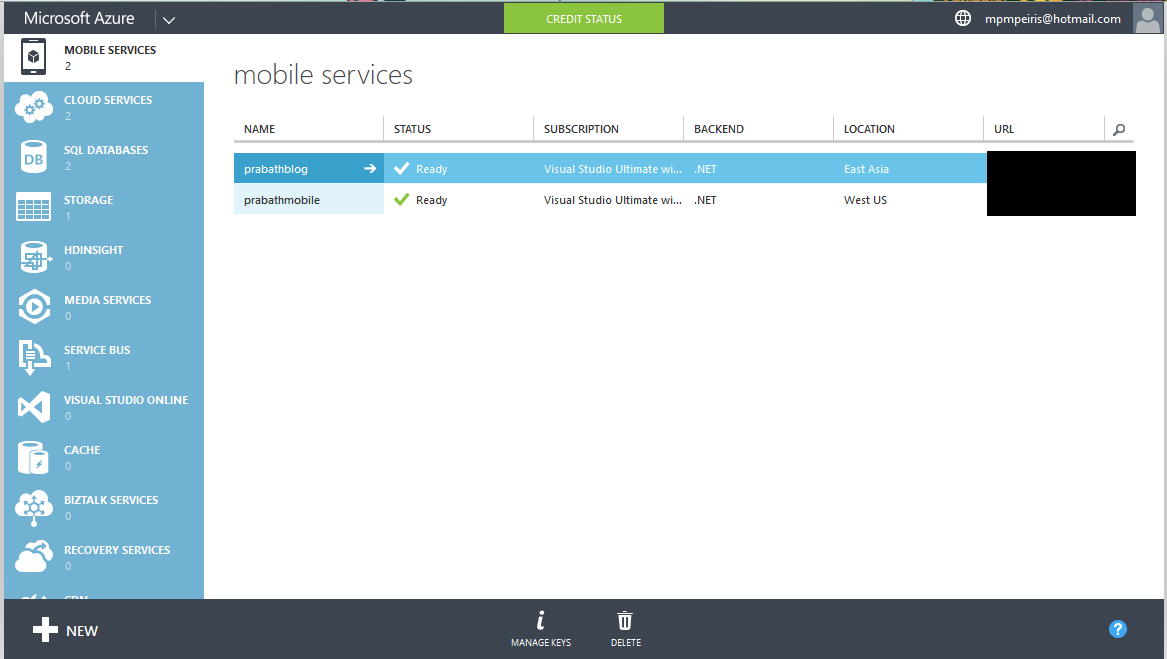
2. Then select your Mobile Service , in here I have already created Mobile Service for the Azure Mobile Services post named as prabathblog. Select it and go inside. Then select IDENTITY  Tab from menu.


3. Fill the values according to the Login provider with details


4. Then go to the dashboard and download the app.

5. Use this code to authenticate in client side

        /// <summary>
        /// Simple authenticate
        /// </summary>
        /// <returns></returns>
        private async Task AuthenticateAsyncSimple()
        {
            while (user == null)
            {
                string message;
                try
                {
                    user = await App.MobileService
                        .LoginAsync(MobileServiceAuthenticationProvider.MicrosoftAccount);
                    message =
                        string.Format("You are now logged in - {0}", user.UserId);
                }
                catch (InvalidOperationException)
                {
                    message = "You must log in. Login Required";
                }
 
                var dialog = new MessageDialog(message);
                dialog.Commands.Add(new UICommand("OK"));
                await dialog.ShowAsync();
            }
        }


Enjoy your code


Monday, September 15, 2014

Work with Async

Asynchronous Programming

If you are working with applications such as windows store and Windows Phone applications you may be found lot of functions that with Async keyword. Why Async?
We need async because when working with applications that interact with network (web, local network) , database, Files and reading hardware in the device are much more slower than the usual execution. Because of it communication bottlenecks are occur.

To avoid those communication bottlenecks async is born.

What Async Does ?

Async allows to run those delayed tasks in the background and meanwhile program can do what ever operations that does not depend on the awaited task.
simply,
"With Async Application can continue with other works that doesn’t depend on blocked resource until the blocked task finished"

Asynchronous programming available with .NET framework 4,5 onwards with Visual studio 2012. If you working on visual Studio 2012 without installing any of other libraries you can work on async

Concepts

Task
Task encapsulate all units of works in the async. Task contains following properties

  • State : Running , Finished , Cancelled
  • Result
  • Thrown Exceptions
It will handle each and every exceptions and it throws all exceptions when task is finished.(await finished)


Important

If you really want to implement async methods and use them remember async and await keywords.

async keyword informs the compiler this method need to be handle separately by itself. Await keyword indicate the suspension of relative running async task.

When working with async,
  • Use Async Suffix  | e.g. DownloadAsync
  • Return Task or Task<T> according to situation
  • void for only event handlers  

Example Wpf Code with simple async operation

public partial class MainWindow : Window
  {
      public MainWindow()
      {
          InitializeComponent();
      }
      private void btnNormal_Click(object sender, RoutedEventArgs e)
      {
          resultTxt.Text = getString("sample");
          independentWork();
      }
      private async void btnAsync_Click(object sender, RoutedEventArgs e)
      {
          resultTxt.Text = await getStringAsync();
      }
      /// <summary>
      /// Method with waiting in synchronize way
      /// ///
      /// </summary>
      /// <returns></returns>
      private string getString(string name)
      {
          //Task.Delay(2000);
          Thread.Sleep(2000);
          return "My String";
      }
      /// <summary>
      /// same method calling from async
      /// </summary>
      /// <returns></returns>
      private async Task<string> getStringAsync()
      {
          Task<string> asyncTask = Task.Factory.StartNew(() => getString("sample"));
          independentWork();
          return await asyncTask;
      }
      
      /// <summary>
      /// this work is independent from others
      /// </summary>
      private void independentWork()
      {
          resultTxt.Text += "\n independent work is done ";
      }
  }


Download Sample Code Here