Wednesday, October 15, 2014

Bug in Async BCL With Portable class libraries

Any of you try to use async framework inside the Portable Class Library (PCL)? Is it working ?
First instance it is not. There is a known bug in Async Framework with Poratable Class Libraries.
It will not detect the async and await correctly with task based operations

How to Fix
First install the BCL Nuget package to he your PCL (Microsoft.Bcl.Async)
in Console -


PM> Install-Package Microsoft.Bcl.Async

Then replace following tags with relevant replacement tag 
    <dependentAssembly>
        <assemblyIdentity name="System.Runtime" publicKeyToken="b03f5f7f11d50a3a" culture="neutral" />
        <bindingRedirect oldVersion="0.0.0.0-2.5.19.0" newVersion="2.5.19.0" />
      </dependentAssembly>
      <dependentAssembly>
        <assemblyIdentity name="System.Threading.Tasks" publicKeyToken="b03f5f7f11d50a3a" culture="neutral" />
        <bindingRedirect oldVersion="0.0.0.0-2.5.19.0" newVersion="2.5.19.0" />
      </dependentAssembly>
    </assemblyBinding>
Saturday, October 11, 2014

Windows Azure Mobile Authentication Service

Magic with Azure mobile services is easy handling in Authentication for users. It allows you to authenticate users
1. Microsoft Account
2. Facebook Account
3. Twitter Account
4. Google Account
5. Azure Active Directory

What else developer need..

To enable all of those authentications you need to have apps running on those platforms. Url's for creating apps on each service provider is given below (Creating app on your hand *Get the developer manual help according to each technology)

1. Microsoft - https://account.live.com/developers/applications
2. Facebook - https://developers.facebook.com/ (Click on App's menu)
3. Twitter - https://apps.twitter.com/app/new
4. Google - https://console.developers.google.com/project

** In every instance that you create apps use your Azure Mobile Service Url 
HERE is URL for Microsoft Login
for json backend :https://<mobile_service>.azure-mobile.net/login/microsoftaccount
for .NET backend :https://todolist.azure-mobile.net/signin-microsoft


With later posts you can see how to use Azure Active directory

Start from the beginning

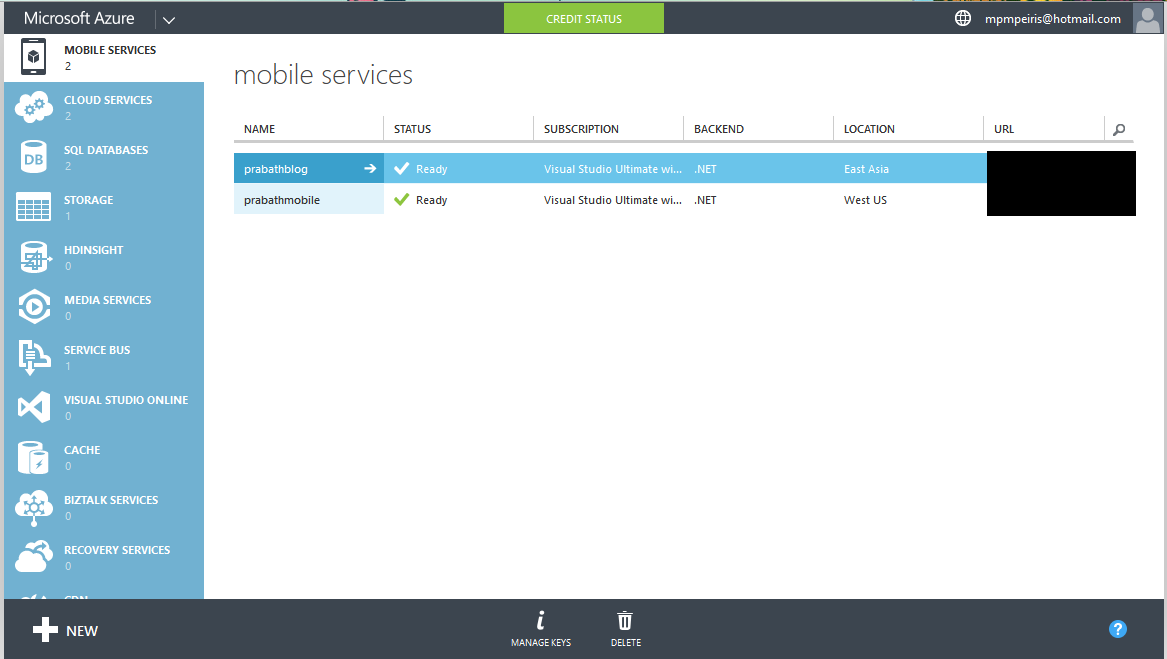
1. First login to your Azure portal and go to Mobile Services


2. Then select your Mobile Service , in here I have already created Mobile Service for the Azure Mobile Services post named as prabathblog. Select it and go inside. Then select IDENTITY  Tab from menu.


3. Fill the values according to the Login provider with details


4. Then go to the dashboard and download the app.

5. Use this code to authenticate in client side

        /// <summary>
        /// Simple authenticate
        /// </summary>
        /// <returns></returns>
        private async Task AuthenticateAsyncSimple()
        {
            while (user == null)
            {
                string message;
                try
                {
                    user = await App.MobileService
                        .LoginAsync(MobileServiceAuthenticationProvider.MicrosoftAccount);
                    message =
                        string.Format("You are now logged in - {0}", user.UserId);
                }
                catch (InvalidOperationException)
                {
                    message = "You must log in. Login Required";
                }
 
                var dialog = new MessageDialog(message);
                dialog.Commands.Add(new UICommand("OK"));
                await dialog.ShowAsync();
            }
        }


Enjoy your code


Monday, September 15, 2014

Work with Async

Asynchronous Programming

If you are working with applications such as windows store and Windows Phone applications you may be found lot of functions that with Async keyword. Why Async?
We need async because when working with applications that interact with network (web, local network) , database, Files and reading hardware in the device are much more slower than the usual execution. Because of it communication bottlenecks are occur.

To avoid those communication bottlenecks async is born.

What Async Does ?

Async allows to run those delayed tasks in the background and meanwhile program can do what ever operations that does not depend on the awaited task.
simply,
"With Async Application can continue with other works that doesn’t depend on blocked resource until the blocked task finished"

Asynchronous programming available with .NET framework 4,5 onwards with Visual studio 2012. If you working on visual Studio 2012 without installing any of other libraries you can work on async

Concepts

Task
Task encapsulate all units of works in the async. Task contains following properties

  • State : Running , Finished , Cancelled
  • Result
  • Thrown Exceptions
It will handle each and every exceptions and it throws all exceptions when task is finished.(await finished)


Important

If you really want to implement async methods and use them remember async and await keywords.

async keyword informs the compiler this method need to be handle separately by itself. Await keyword indicate the suspension of relative running async task.

When working with async,
  • Use Async Suffix  | e.g. DownloadAsync
  • Return Task or Task<T> according to situation
  • void for only event handlers  

Example Wpf Code with simple async operation

public partial class MainWindow : Window
  {
      public MainWindow()
      {
          InitializeComponent();
      }
      private void btnNormal_Click(object sender, RoutedEventArgs e)
      {
          resultTxt.Text = getString("sample");
          independentWork();
      }
      private async void btnAsync_Click(object sender, RoutedEventArgs e)
      {
          resultTxt.Text = await getStringAsync();
      }
      /// <summary>
      /// Method with waiting in synchronize way
      /// ///
      /// </summary>
      /// <returns></returns>
      private string getString(string name)
      {
          //Task.Delay(2000);
          Thread.Sleep(2000);
          return "My String";
      }
      /// <summary>
      /// same method calling from async
      /// </summary>
      /// <returns></returns>
      private async Task<string> getStringAsync()
      {
          Task<string> asyncTask = Task.Factory.StartNew(() => getString("sample"));
          independentWork();
          return await asyncTask;
      }
      
      /// <summary>
      /// this work is independent from others
      /// </summary>
      private void independentWork()
      {
          resultTxt.Text += "\n independent work is done ";
      }
  }


Download Sample Code Here

Saturday, September 13, 2014

Improve Performance of the Application

As and software producer all of us want to do is software product with correct functionality. Is that enough ? No. We need to give product with correct functionality with optimum resource consumption as well.

Today I'm going to tell you some tips and trikes about resource optimization. basically it is about Memory and CPU resources.

1. Switch for multiple If
 When you are using multiple If conditions ( Most of the time more than 2 ) CPU (Registry level) instructions check as far as use much If with code. It consume more registers in CPU. But with switch it just use check and Jump CPU instruction that far more faster than assignments. Using jump tables makes switches much faster than some if-statements

Use switch when ever possible once you find more than two if statements.

2. Use structures according to the situation
Execution of class is much more consume resources than class.  Whenever you don't need to use functions bind with objects and when you don't go with boxing and unboxing much with code.

3. Chunky calls
Don't let your functions to handle lot of task by itself. use modularity to avoid it.

4. Add Collections
Never try to assign collection items one by one to the another collection. Just try to use simple casting and try to add entire collection directly.

5. Working with strings.
When you are working with string most of the cases we try to concatenate string by '+'operator.(including me ). But sad story is there is more optimal solution than that. use string bulider to concatenate strings.

Here for start.

6. Use bits whenever as possible.
I saw most of the programmers use integers/strings to hold the simple states, flags. Please don't do that there is more than 2 states. Just use bit or bool to store states. It will optimize code and resource as well. ( Simply bit is smaller than more bits)

7. Array as possible
When we use simple basic array it will helpful to maintain machine instructions(registry). Other collections need more than array because most of them are derived form it. Array is basic element in modern machine instructions.

8. ObservableCollection vs List
Use List whenever that your items not binded with the UI. Observation collections are derived from List and it also holds the property changed notifications. If there is no use of property change go for List.  ObservableCollection check the property change when it on use and because of that it consume more.

9. For than foreach
Use while, for and do while loops wherever than foreah. foreach has good performance but basic loops are better than it.

10. ToString
Some  programmers use ToString method wherever elements are already strings. Use ToString wherever the element that con the string. don't use ToString as habit. With integers use
ToStringLookup will optimize memory heap that using with converting integer.

11. Don't sort collections already sorted.
Check collection already sorted or not before sort it.

12. Global variables.
Use global variables when you using same type of object frequently

13. Constant and static
Constants are not assignable memories but they are easy to load.

Static is more faster than instant creations. When load statics no need of run time to check the instance


Hope this is helps...


Wednesday, September 10, 2014

Starts with MVVM

With the growth of programming and application development  there are major requrement that emerged the design patterns. Such as MVP(Model View Presentation) and MVC (Model View Controller) are common design patterns that allows developer to isolate codes. Bu the advanced features of XAML such as data biding, data templates, commands and on demand interaction between application and logic's guide world to MVVM (Model View ViewModel)

MVVM basically derived from the MVC design pattern. It clearly  create separation between these MVVM layers more than MVC.


Model contains all abstraction of data  not any logic's behind data. View is contains XAML views still not the logics. Importance is Model and view are not directly inter action with each other.


ViewModel Contains all  business logic's and data bind properties such as Collections. And it will interact with the View and Model. It takes notifications from model and send them to View as well as other way around.

Ex: If new item added to collection in view It automatically notify and update the View without any interaction.

Study Simple MVVM code here


Full Code In Media Fire 
http://bit.ly/MvvMDemo