Showing posts with label NoSQL. Show all posts

Sunday, February 28, 2016

Mongo DB With C# API V2

Let's start and check the latest  MongoDb Driver for C# (Mongo V2).

If you are not still configured your Mongo Server yet. see this Post

If you need some guide on old MongoDb Driver V1. See this Post

New Features In V2

  •  Async Support 
  • Method Naming convention with helpful names ( SelectOne, InsertOne etc) 
  • Legacy API Support 

Here is the Db Structure and Sample Data I'm going to Use 

 DB Structure : Create Collection in Mongo Server With name of  Students


Here is some sample Json Data for Students Collection 

/* 1 */
{
    "_id" : ObjectId("56c3206ddaa3d39f5a130bcc"),
    "StudentId" : 1,
    "Name" : "Saman kumara",
    "Address" : "Sample"
}

/* 2 */
{
    "_id" : ObjectId("56c69ed3926ffb2c80ed00bb"),
    "StudentId" : 2,
    "Name" : "Piyal kumara",
    "Address" : "adadasd"
}


1. Create New MVC Website from Visual Studio

2. Add New Class to the models called Student
public class Student
    {
        [BsonRepresentation(BsonType.ObjectId)]
        public string Id { get; set; }
        public int StudentId { get; set; }
        public string Name { get; set; }
        public string Address { get; set; }
    }


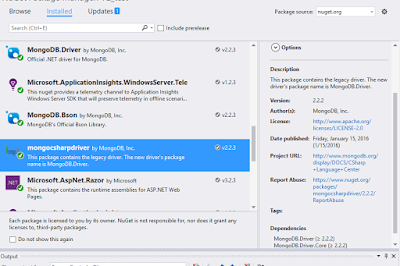
3. Install MongoCsharpDriver Nuget package from the Nuget


4. Create ConnetcionString  and Database Variables for mongodb by  R-click on Project -> Properties -> Settings Add relevant values of variables.


5.  Create DbContext Class MongoDbContext 

public class MongoDbContext
    {
        public IMongoDatabase Database;
 
        public MongoDbContext()
        {
            var client = new MongoClient(Settings.Default.ConnectionString);
            Database = client.GetDatabase(Settings.Default.Database);
        }
 
        public IMongoCollection<Student> Students
        {
            get { return Database.GetCollection<Student>("Students"); }
        }
    }


Get data From Mongo

1. Add following code to the HomeController
 Create Private property of Context and initialize it

private MongoDbContext _context { get; set; }
 
       public HomeController()
       {
           _context = new MongoDbContext();
       }
       // GET: Home
       public  ActionResult Index()
       {
           //Get Data from Db
           ViewBag.Data = _context.Students.AsQueryable().Select(a=>new Student { Name=a.Name,Address=a.Address ,StudentId=a.StudentId}).ToList();
           return View();
       }

2. Edit The View as following

@{
    ViewBag.Title = "Index";
}
 
<h2>Index</h2>
@Html.ActionLink("Create", "Create")
 
 
<table class="table">
    <tr>
        <th>
            Student Id
        </th>
        <th>
            Name
        </th>
        <th>
            Address
        </th>
        <th>
 
        </th>
    </tr>
 
    @foreach (var stu in ViewBag.Data)
    {
        <tr>
            <td>
               @stu.StudentId
            </td>
            <td>
                @stu.Name
                
            </td>
            <td>
               @stu.Address
            </td>
            <td>
                @Html.ActionLink("Edit", "Edit", new { id = @stu.StudentId }) | 
                @Html.ActionLink("Delete", "Delete", new { id = @stu.StudentId }) 
            </td>
        </tr>
    }
 
</table>


3. Run and see the result ..

Add Documents


Here is sample async code for insert element to the Mongo Context

[HttpPost]
       [ValidateAntiForgeryToken]
       public async Task<ActionResult> Create([Bind(Include = "StudentId,Name,Address")] Student student)
       {
           try
           {
               //Insert one item 
               await _context.Students.InsertOneAsync(student);
               return View();
 
           }
           catch (Exception)
           {
               return View(student);
           }
 
       }
 

Filter Elements

private Student GetStudent(int id)
        {
            //Filter element
            var std = _context.Students
                .Find(r => r.StudentId == id)
                .FirstOrDefault();
            return std;
        }


Update Or Replace Element 

[HttpPost]
       [ValidateAntiForgeryToken]
       public async Task<ActionResult> Edit([Bind(Include = "id,StudentId,Name,Address")] Student student)
       {
           //Full update /replace
           // await _context.Students.ReplaceOneAsync(r => r.StudentId == student.StudentId, student);
          
           //Partial Update
           var update = Builders<Student>.Update.Set(s => s.Name, student.Name);
           await _context.Students.UpdateOneAsync(r => r.StudentId == student.StudentId, update);
           return RedirectToAction("index");
       }


Delete element


public async Task<ActionResult> Delete(int id)
       { 
           //Delete element           
           await _context.Students.DeleteOneAsync(s=> s.StudentId==id);
           return RedirectToAction("index");
       }


Full code In Git ..

https://github.com/prabathsl/DI_Sample


 Enjoy Coding


Sunday, March 8, 2015

MongoDb With C Sharp

This post is related with the post that I put few months ago, If you don't have already configured Mongodb on the machine Here is the post that I put

Big question ?? How we use Mongo With C#? Is it hard?

Its really easy to use Mongo in .NET ,

Here im going to create Asp.NET Web API project for demonstration. (You can use any type of project )

Then Install official MongoDb Driver for .NET it name as MongoCsharpDriver Nuget package


Here is screenshot of my Mongo Database and document that I'm going to use


Here is the class I created for mongo operations


using MongoDB.Bson;
using MongoDB.Driver;
using System;
using System.Collections.Generic;
using System.Linq;
using System.Web;
 
namespace MongoDb.Models.MongoModels
{
    public class MongoConnection
    {
        private MongoServer _ServerConnection { get; set; }
        public MongoDatabase _Database { get; set; }
        public string _ConnectionString { get { return "Server=localhost:27017"; } }
        public MongoConnection()
        {
            MongoClient client = new MongoClient(_ConnectionString);
            this._ServerConnection = client.GetServer();
            ////////////////////Old way of create server////////////////////
            //this._ServerConnection=MongoServer.Create(_ConnectionString);
 
            //Set the database 
            this._Database = _ServerConnection.GetDatabase("DocumentOrDb");
        }
 
        /// <summary>
        /// Get all data in the document
        /// </summary>
        /// <returns></returns>
        public MongoCursor<BsonDocument> GetAllUserdata()
        {
            return _Database.GetCollection<BsonDocument>("UserDetails").FindAll();
        }
 
        /// <summary>
        /// Insert Item
        /// </summary>
        /// <param name="name"></param>
        /// <param name="address"></param>
        /// <returns></returns>
        public BsonDocument Insert(string name, string address)
        {
            MongoCollection<BsonDocument> UserDetails = _Database.GetCollection<BsonDocument>("UserDetails");
 
            BsonDocument NewRecord = new BsonDocument()
            {
               { "Name",name},
               {"Address",address}
            };
 
            UserDetails.Insert(NewRecord);
            //return last inserted element 
            return UserDetails.FindAll().Last();
        }
    }
 
}

**This code is use latest standards of official mongo driver up to today 
Then use this class with the code. That's It

Enjoy :)


Full Code 
http://bit.ly/MongoCSharp

Wednesday, November 12, 2014

NodeJs web service With MongoDb

NodeJs is one of the powerful Lagrange that can do lot of things in programming world. When size of data become larger most of databases not can handle them efficiently. Therefor it leads to the change of database structure. Relational (SQL) database is not the best solution in most cases. NoSQL (Not Only SQL) databases are the best solution in those situations. One of the best NoSQL databse is MongoDb.

You can follow above hyperlinks to download and configure Nodejs and MongoDb within your local machine. if you having trouble  just comment below..ill update another post about configurations.

With this post I am going to demonstrate how to create REST service with NodeJs and MongoDB

You can use SublimeText as text editor for node js

1 . First create Document in MongoDb Name it and UserDetails

2. Add following Data to that document
/* 0 */
{
    "_id" : ObjectId("54608e50feeb4595a4f09651"),
    "userName" : "Harith",
    "Age" : 25,
    "Expired" : true
}
 
/* 1 */
{
    "_id" : ObjectId("54608ea4feeb4595a4f09652"),
    "userName" : "Jaliya",
    "password" : "123456",
    "Age" : 30
}
 
/* 2 */
{
    "_id" : ObjectId("5461d46dfeeb4595a4f09655"),
    "name" : "Joe Bookreader",
    "address" : {
        "street" : "123 Fake Street",
        "city" : "Faketon",
        "state" : "MA",
        "zip" : "12345"
    }
}
 
/* 3 */
{
    "_id" : ObjectId("54608f20feeb4595a4f09653"),
    "UserId" : "1",
    "address" : {
        "street" : "123 Fake Street",
        "city" : "Faketon",
        "state" : "MA",
        "zip" : "12345"
    }
}


Lets start to create NodeJs REST

First create Javascript file named it as Rest.js

To use MongoDb you need to install flowing npm package by this command
 npm install mongojs

Then add package.json file to the root of the folder and copy this to it

{
  "name": "Rest-server",
  "version": "0.0.1",
  "private": true,
  "dependencies": {
    "express": "3.3.4"
  }
}

Go to CMD and type npm install


Then start to coding real service in Rest,js

1. Import following libraries to the js file
var express = require('express');
var mongojs = require('mongojs');


2. Then create Array to store all data that comes from Mongo Database
var data = [];

3. Lets code REST Like this
// custom package
var app = express();
 
// Array definition to store data
var data = [];
 
// Http Normal get
app.get('/', function (req, res) {
    var db = require('mongojs').connect('mongodb://localhost:27017/DocumentOrDb');
    console.log("Server is in listen1");
    db.collection("UserDetails").find(function (err, docs) {
        data = [];
        docs.forEach(function (item) {
            data.push(item);
        })
    });
 
    console.log("Server end");
    res.send(data);
});

then run the service with cmd node Rest.js


Here is the full code


/*
  Rest Api with MongoDb Database 
  Author : prabathsl
  Copyright © prabathsl 2014
*/
 
// Libraries
var express = require('express');
var mongojs = require('mongojs');
 
// custom package
var app = express();
 
// Array definition to store data
var data = [];
 
// Http Normal get
app.get('/', function (req, res) {
    var db = require('mongojs').connect('mongodb://localhost:27017/DocumentOrDb');
    console.log("Server is in listen1");
    db.collection("SampleBigdata").find(function (err, docs) {
        data = [];
        docs.forEach(function (item) {
            data.push(item);
        })
    });
 
    console.log("Server end");
    res.send(data);
});


 Enjoy :) 


Thursday, February 14, 2013

Document Oriented Database

        Designed for storing, retrieving, and managing document-oriented, or semi structured data, information. Document-oriented databases are one of the main categories of so-called NoSQL databases and the popularity of the term "document-oriented database" (or "document store") has grown with the use of the term NoSQL itself. In contrast to well-known relational databases and their notions of "Relations" (or "Tables"), these systems are designed around an abstract notion of a "Document".           
 At the highest level of organization, it is quite similar to a relational database, but as you get closer to the data itself, you will notice a significant change in the way the data is stored. Instead of databases, tables, columns, and rows you have documents. A document doesn’t have a direct correlation in the relational world. Documents do not have a predefined schema like relational database tables. A document is partly a row, in that it’s where the data is located, but it's also part columns, in that the schema is defined in each document (not table-wide).

          The best way to think of a document is as a multidimensional array. In an array, you have a set of keys that map to values. The values could themselves be another array. Documents map extremely well to objects and other PHP data types like arrays and even multidimensional arrays. Documents encapsulate and encode data (or information) in some standard formats or encoding. Encoding in use include XML, YAML, JSON, and BSON, as well as binary forms like PDF and Microsoft Office documents.
           Currently lot of web based online shopping websites are moving to this kind of databases. Simple and amaizing handling with database solutions like MongoDB, Apache CouchDB , Clusterpoint etc